Configuring a Buildroot Package
When setting up a Buildroot package for your ACU6 project, start by resetting the configuration to the ACU6 defaults. This gives you a clean base for the package setup.
Initialization Process
- Reset Configuration to Default: From the project root,
run
make defconfig. This resets the configuration to the ACU6 default settings.
- Package Placement: Place the new package in the
myprojdirectory underexternals. The project template already provides part of the required structure.
Understanding the File Structure for Buildroot Package
Properly organizing the file structure is a key aspect of setting up a new package in your ACU6 project. This structure serves as the blueprint for your package’s configuration and integration.
File Structure Overview
The main externals directory should contain the
myproj folder. Inside myproj, you will find several
important files and subdirectories:
Config.in- Configuration interface file.configsdirectory withmyproj_defconfig.external.desc- Describes the external module.external.mk- Master makefile. It automatically findsany
.mkfiles in directories under thepackagefolder.
packagedirectory, which should include:hello-acu6folder.
Creating the Package Skeleton
Create the led-example directory inside the package
directory, then add the basic package structure shown
below. This is a standard Buildroot task and does not
require any ACU6-specific changes.
package/
└── led-example/
    ├── Config.in
    ├── led-example.mk
    └── files/
        ├── led_example.c
        └── Makefile
Required Files: Create the following empty files and
directories in the led-example package:
Config.in- Configuration script for Buildroot.led-example.mk- Buildroot makefile for the package.filesdirectory containing:led_example.c- C source file for the package.Makefile- Used to compile the source file.
Configuring the Config.in File for the led-example Package
The Config.in file defines how the led-example
package appears in the Buildroot menu.
The Config.in file should contain the following
configuration for the led-example package:
config BR2_PACKAGE_LED_EXAMPLE
	bool "led-example"
	select BR2_PACKAGE_ACTIA_LIB
	help
	   LED example
Important
The select BR2_PACKAGE_ACTIA_LIB line does not set up the entire
dependency chain on its own. It makes sure actia-lib is selected when
led-example is enabled in the Buildroot configuration. The build-time
dependency is completed in led-example.mk.
Creating and Configuring the led-example.mk Makefile for Buildroot Integration
The led-example.mk file connects the led-example
package to the Buildroot build system. It follows the
standard format used by generic Buildroot packages, which
keeps the integration straightforward.
Key Points for the Makefile
- Standard Buildroot Makefile:
led-example.mk should follow the usual Buildroot conventions, including the build rules and package dependencies.
- Standard Buildroot Makefile:
- Integration with Buildroot: This file ties the
package into the Buildroot build flow so it is compiled and included in the final image.
LED_EXAMPLE_VERSION = 0.1
LED_EXAMPLE_SITE = $(LED_EXAMPLE_PKGDIR)/files
LED_EXAMPLE_SITE_METHOD = local
LED_EXAMPLE_LICENSE = Actia Software License Agreement
LED_EXAMPLE_LICENSE_FILES = EULA COPYING
LED_EXAMPLE_REDISTRIBUTE = NO
LED_EXAMPLE_INSTALL_TARGET = YES
LED_EXAMPLE_DEPENDENCIES = actia-lib

define LED_EXAMPLE_BUILD_CMDS
    $(TARGET_CONFIGURE_OPTS) $(MAKE) -C $ $(@D)
endef

define LED_EXAMPLE_INSTALL_TARGET_CMDS
    $(MAKE) -C $(@D) install DESTDIR=$(TARGET_DIR) PREFIX=/usr
endef

$(eval $(generic-package))
When configuring led-example.mk, check that the package
variables follow Buildroot’s package infrastructure and that
any local variables are named to avoid collisions.
Specific Configurations
- Variable Naming: Most package variable names are
defined by the Buildroot package infrastructure. For any local variables you add, use a package-specific prefix, such as
LED_EXAMPLE_, so they do not clash with variables from other packages or internal Buildroot variables. See Section 18.6.2, generic-package reference, for the package infrastructure details.
Defining Dependencies: The dependency declaration is:
LED_EXAMPLE_DEPENDENCIES = actia-lib
Important
This line completes the dependency setup by telling Buildroot that
led-exampledepends onactia-libduring the build. Together withselect BR2_PACKAGE_ACTIA_LIBinConfig.in, this ensures the package is both enabled in the configuration and built in the right order.
Starting with a Basic Source File for led-example
With the led_example.c file created as part of the
package skeleton, add a simple initial implementation in
the files directory. This file is the starting point
for the application and can be expanded later.
Basic led_example.c Structure
Start with a basic structure in your led_example.c file:
#include <stdio.h>

int main(void)
{
    printf("Under construction\n");

    return 0;
}
This code prints Under construction when it runs,
showing that the application is still in an early stage
of development.
Detailed Makefile for led-example Package
With the Makefile created as part of the package
skeleton, add the build rules for the led-example
package. This file defines how to compile the source code
and build the executable.
Complete Makefile Content
TARGET_BIN  = led-example

CFLAGS  += -MMD -MP -Wall -Wextra -pedantic -Werror -Wno-error=deprecated-declarations

LIBS    += -lactia

C_SRCS   = led_example.c

OBJS     += $(patsubst %.c, $(BUILD_DIR)/%.o, $(C_SRCS))
OBJS     += $(patsubst %.S, $(BUILD_DIR)/%.o, $(ASM_SRCS))

DEPS = $(OBJS:%.o=%.d)

BUILD_DIR = build

.PHONY: all

all: $(BUILD_DIR)/$(TARGET_BIN)

$(BUILD_DIR)/$(TARGET_BIN): $(OBJS)
	@echo LINK $@ $(LDFLAGS)
	@$(CC) $(CFLAGS) $(LDFLAGS) $(OBJS) $(LIBS) -o $@

$(BUILD_DIR)/%.o: %.c
	@echo CC $<
	@mkdir -p $(@D)
	@$(CC) -c $(CFLAGS) $< -o $@

install: all
	@install -m 755 $(BUILD_DIR)/$(TARGET_BIN) $(DESTDIR)/$(PREFIX)/bin

clean:
	@-rm -rf $(BUILD_DIR)/

-include $(DEPS)
This Makefile contains the settings for building the target
binary, compiling source files, installing the result, and
cleaning up build artifacts.
Adding the led-example Package to the Build Tree
Integrating led-example into the Buildroot build tree
requires updates to a few key files in myproj.
Understanding their roles makes the setup easier to follow.
Key Files and Modifications
- external.mk File: As described earlier,
external.mk automatically locates any
.mkfiles in directories under the package folder, so no changes are required forled-example.
- external.mk File: As described earlier,
- Config.in File: This file allows the configuration
system to find the
Config.infile created forled-example. That makes the package available for selection in the build configuration. Add the following line:source "$BR2_EXTERNAL_MYPROJ_PATH/package/led-example/Config.in"
Add it alongside similar source lines, such as the one for
hello-acu6.
Finalizing Setup with Menuconfig for led-example Package
The last setup step is to add led-example to the active
configuration. Do this through make menuconfig from the
project root, where the package can be selected in the
Buildroot configuration interface.
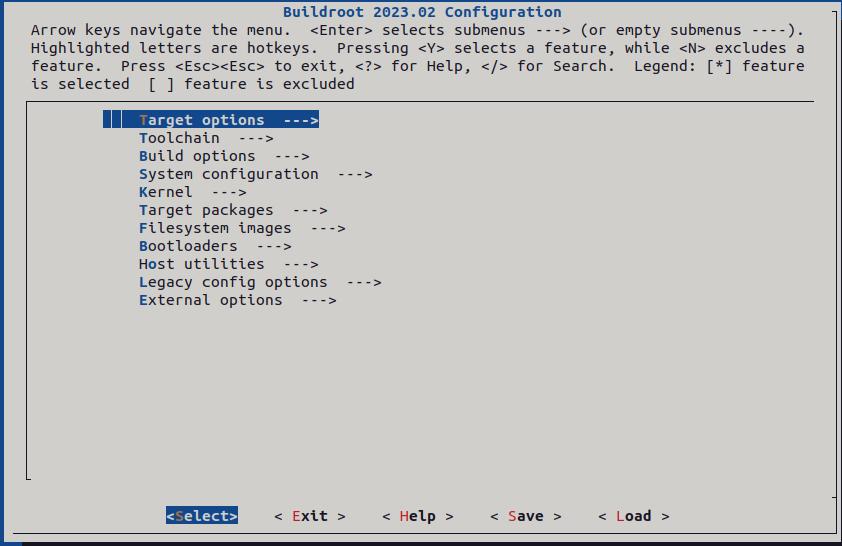
Opening the configuration menu: Run make menuconfig from the project
root to open the Buildroot configuration interface.
Searching for the package symbol: Press / and search for the symbol
defined in Config.in. In this example the symbol is
BR2_PACKAGE_LED_EXAMPLE. You can search for the full symbol name or just a
distinctive partial string.
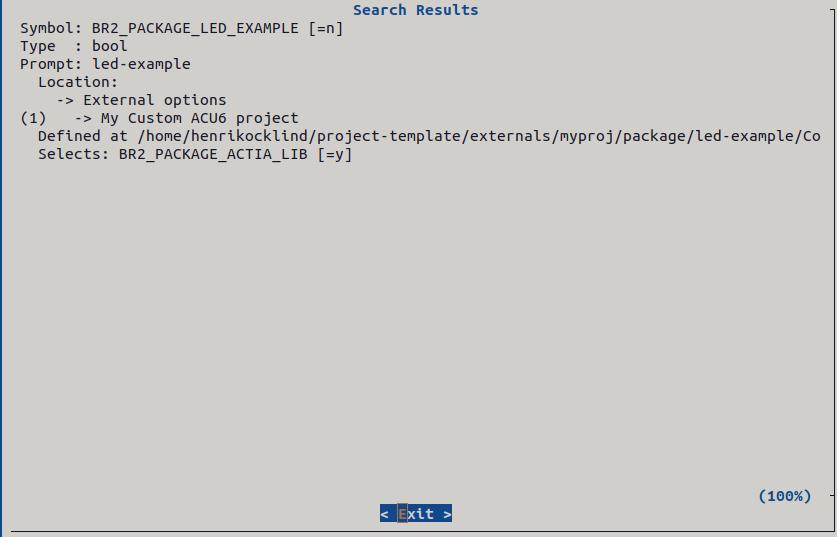
Selecting the matching entry: Open the matching entry shown in the search
window. In this example, pressing 1 opens the first matching result, which
is led-example. If your search returns multiple relevant matches, choose
the number corresponding to the correct entry instead of pressing 1
automatically.
Enabling the package: Press Y to enable led-example, then save the
configuration and exit the tool.
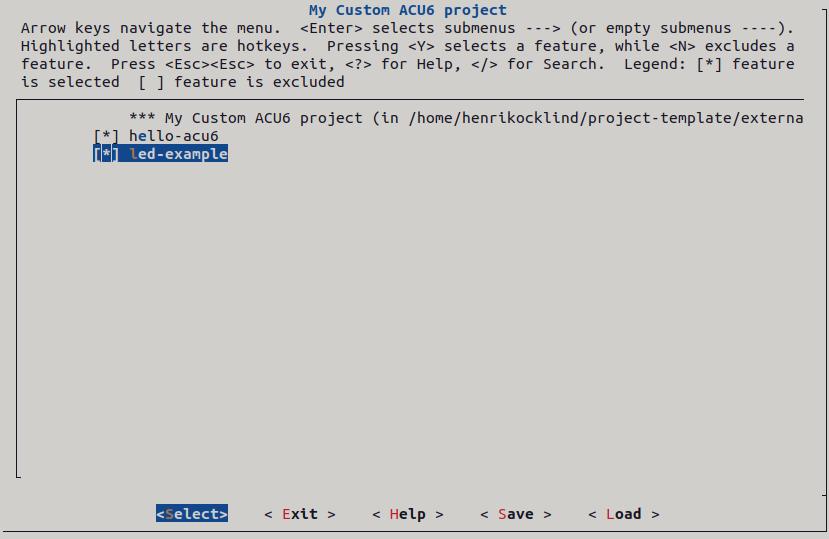
Verifying the Configuration of the led-example Package
After setting up led-example, verify that the
configuration is correct. The following steps confirm that
the package builds and runs as intended.
Steps for Configuration Verification
Clean the directory:
make buildroot-led-example-dircleanNote
Buildroot does not track local source file changes as rebuild triggers, so editing a source file does not cause it to recompile automatically. The
dircleanstep forces a full rebuild of the package. For more targeted rebuild commands that avoid a full clean, see the Buildroot manual.Compile the project:
makeFlash the build onto the target device:
make flashConnect to the target device:
ssh acu6proRun the package on the device:
led-example
Expected Output: The phrase Under construction
should appear in the command-line output. If you see this
message, the package has been configured correctly.